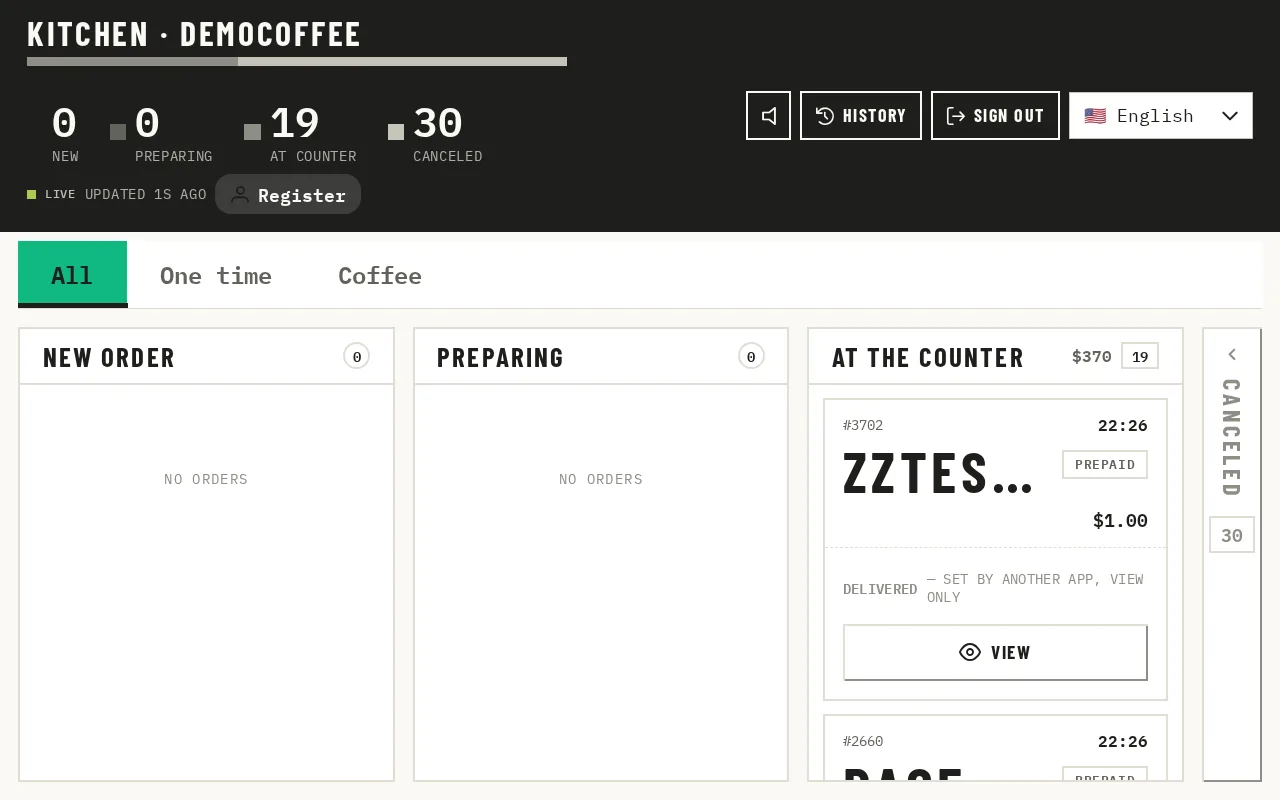
Every order appears the moment it's sent — from the kiosk, the online store or a walk-up sale at the register — sorted New, Preparing, or At the Counter.
A running timer on each ticket changes colour the longer it waits, so nothing sits forgotten during a rush.
Tap or drag a ticket to move it along, and print a paper copy if your line cook wants one.
One board, every channel
There's no second screen to check for online orders — everything lands here.
Built to stay running
A wake lock keeps the screen on, a sound announces new tickets, and anything left untouched for two hours closes itself out instead of piling up forever.
Only what the kitchen needs
Items, modifiers and a pickup name — no prices, no customer details. A station filter and a language switcher keep a busy board readable.
Questions
How is this different?+
It isn't a printer ticket rail. Every order from every channel — kiosk, online store, register — lands on the same board in real time, with a timer counting from when the order was actually placed.
What do I control?+
Which station sees which items, the display language, and whether a new-order sound plays. The timer colours and the two-hour auto-close are fixed.
What does it need?+
A tablet, or any device with a browser, mounted where the kitchen can see it, plus Wi-Fi left on. There's no offline mode — a dropped connection means new tickets wait until it reconnects.